
18Aug
Confidence & collaboration
Building together in the woodland
Elsa tested two ways to support the shelter roof, listened to another idea and explained why the stronger structure worked.
One connected platform
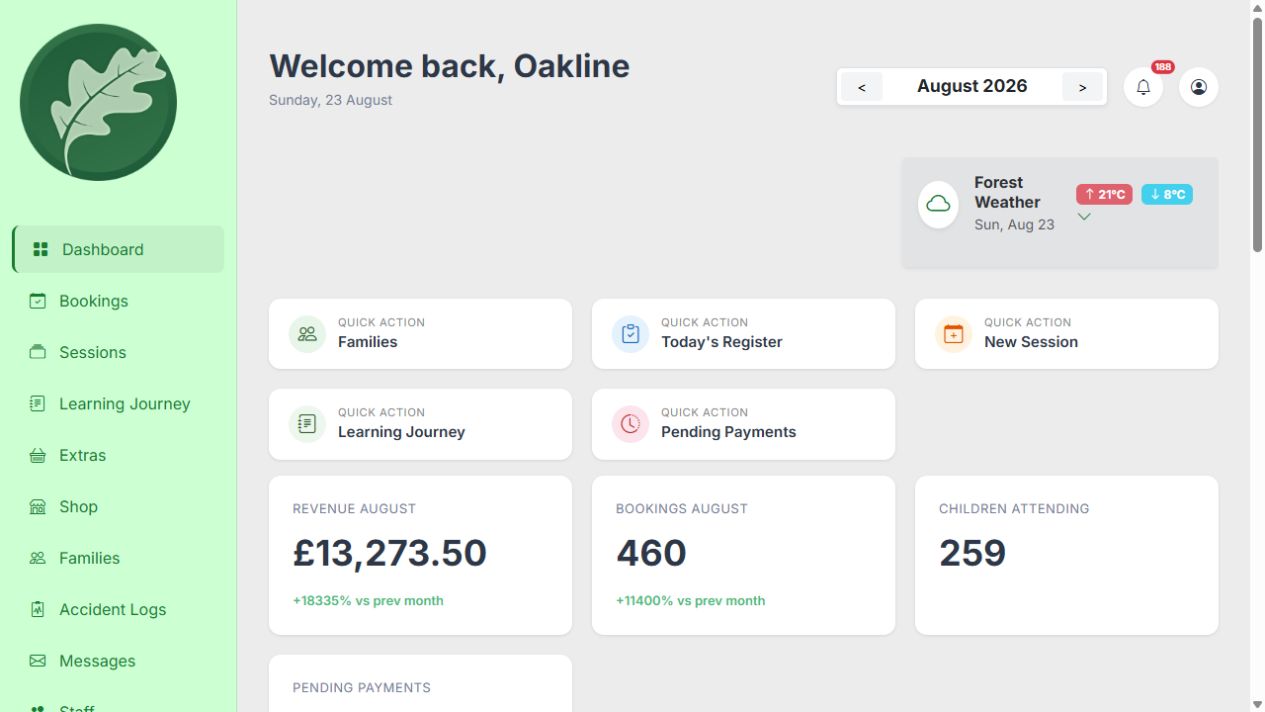
Bookings, payments, medical and SEND registers, session risk-benefit assessments, staff operations, observations and Learning Journeys share the same information, from the first family booking to the story you send home.
Designed around the real day
Oakline understands that a place on a session becomes a payment, a register entry, safeguarding context, a staff task and eventually part of a child's story.
Each feature is useful on its own. The real difference is what happens when they stay connected.
01 / Bookings and payments
Offer full blocks, selected dates, individual sessions, holiday clubs and private parties without forcing every programme into the same booking model.
02 / Registers and child context
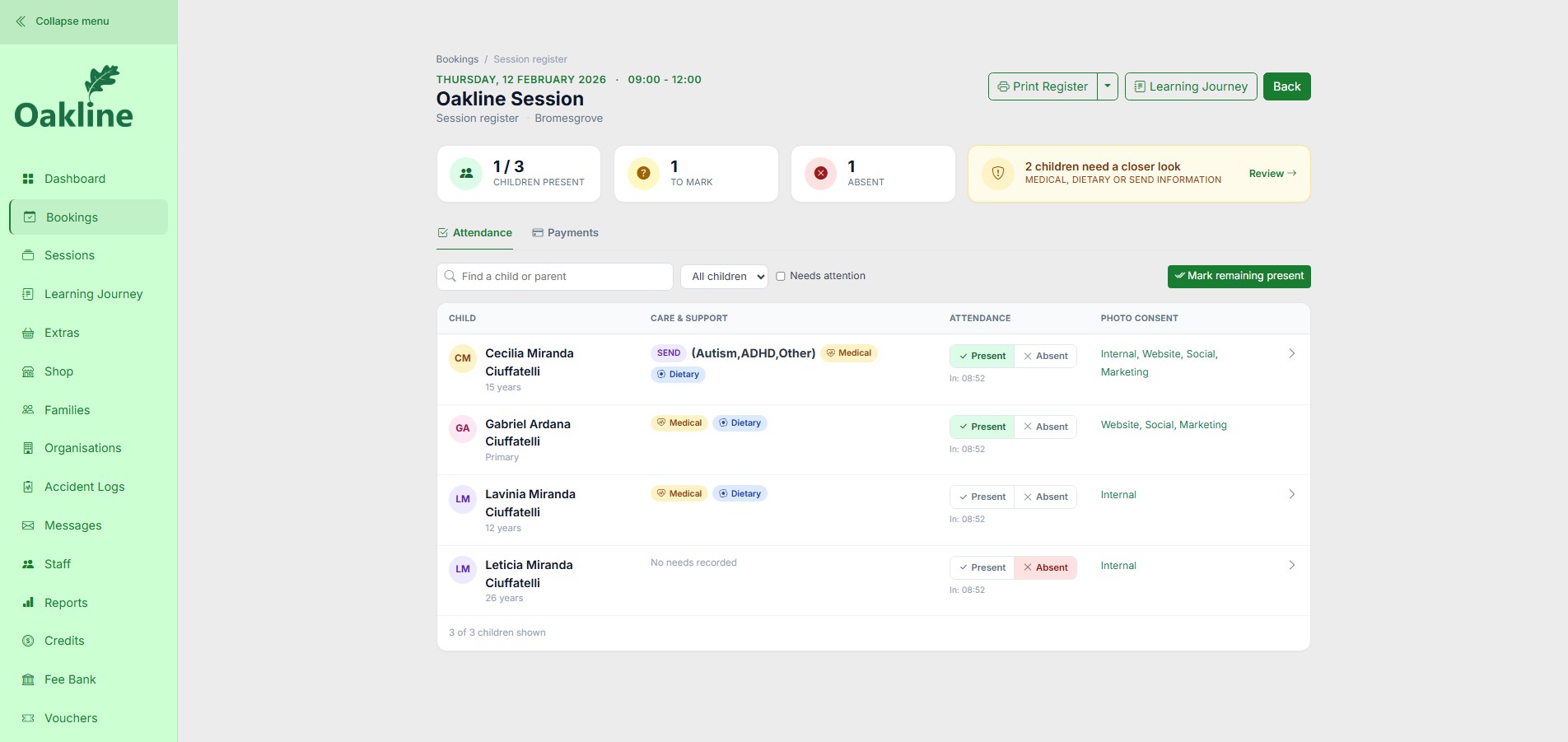
Confirmed bookings become the working register ahead of the session, so your team can see who's booked in, who needs a closer look, and what to prepare for — not just who turned up.
03 / Installable field app
Install Oakline as a Progressive Web App on supported phones, tablets and computers. Full offline field capability keeps the register, medical and SEND information, and supported attendance and Learning Journey actions moving through unreliable signal.
04 / Observations and Learning Journeys
Start with the session, add the shared story of the day and move into an individual child when an observation deserves its own place. Previous notes remain visible so practitioners can continue a meaningful thread.
Elsa tested two ways to support the shelter roof, listened to another idea and explained why the stronger structure worked.
Returned to the task after the first attempt did not hold.
05 / Branded parent app and connected records
Families do not just receive a booking link. On supported devices they can install your tenant-branded parent portal and return for bookings, balances, messages, Learning Journeys and the child information that follows them into each session.
First aid, observations, people involved and follow-up remain together in one authorised record.
06 / Accident and incident logs
Capture an accident or incident against the relevant session and child, with the operational detail needed for follow-up and an organised history for authorised administrators.
07 / Parties and private events
Party bookings have their own operational needs. Oakline connects the organiser booking with deposits, extras, guest invitations, capacity and rescheduling.
07 / Daily operations
Oakline brings the supporting work into the same platform without turning every screen into an enterprise dashboard.
See who is booked in, who needs a closer look, and move from present, absent or to-mark into recorded medical, dietary, SEND, emergency contact, GP and consent details. Attendance connects straight into that session's Learning Journey and Accident Logs.
Explore registersFilter transactions by status, period, date range or customer, see refund, credit and discount detail, then export as CSV or PDF.
Explore reportsSend the booking confirmation, then a separate provider-written welcome email with the kit list, weather notes, water-play reminders or meeting point for that session.
Explore parent communicationStructured information for authorised teams, connected to the child and organisation. An accident record can only be logged against children the register shows as present that day.
Offer the choices families need without maintaining a separate sales system.
Use the read-only tenant sessions API to present current public sessions without an iframe.
Explore the APIPrivacy and UK GDPR
Oakline is designed with UK GDPR responsibilities in mind. The forest school or organisation remains the data controller for its family and staff information, while Oakline processes platform data on its behalf.
Read about security & GDPRProvider, staff and parent areas expose different records and actions according to the signed-in account role.
Providers control staff access and maintain child, medical, emergency and consent information in context.
Production traffic uses HTTPS, while card information and payment processing remain within Stripe.
Oakline provides controls and support, while each provider remains responsible for its policies, lawful basis and staff practice.
One continuous workflow
Oakline keeps each stage connected so teams can move forward without re-entering the same information.
Verify before deciding
Use the maintained feature matrix for current availability and the factual comparison for the different strengths of Oakline and Forest School App.
Clear answers
Yes. You can sell full blocks, selected dates, individual occurrences and holiday programmes from the same platform.
Yes. Family accounts support siblings, shared details, bookings, balances and learning journeys.
Yes. Oakline is a Progressive Web App that can be installed from a supported browser and launched in a standalone app window on phones, tablets and computers.
Start without a card and explore every feature from the beginning.